Track Command
This section assumes you are very familiar with the concepts, terms and ideas for protograf as presented in the Basic Concepts , that you understand all of the Additional Concepts and that you’ve created some basic scripts of your own using the Core Shapes.
This is part of the set of commands use for Layouts.
Overview
The Track() command is designed to lay out a number of items — letters or numbers, or shapes — at the vertices of another shape.
Each vertex is assigned a sequence number; so a Rectangle has vertices
numbered from 1 to 4; whereas a 12-sided Polygon has vertices numbered
from 1 to 12.
The sequence number can be assigned to be used by, or as part of, text using
the special keyword {{sequence}}.
Apart from the Track() command described here,
there are also these other commands which allow you to layout
elements in a more repetitive or regular way within a page:
Usage
The Track() command accepts the following properties:
track - this is the first property accepted, and must correspond to one of the allowed Track types;
Circle,Rectangle,Square,Polygon, orPolylineshapes - this is a list one of the core shapes available, for example, a circle or rectangle; the shape, or shapes, in the list are drawn at each location in the sequence on the Track
stop - the sequence number of the last shape to be drawn
start - the sequence position from where drawing of shapes must start; the default start position varies according to the type of track selected
clockwise - by default, shapes are drawn anti-clockwise from the start; set this to
Trueto alter the drawing ordersequences - a list (or a string that can be expanded to a list) of the only sequence positions that must be drawn; any position not in this list is not drawn
angles - used only with a
Circle()track; a list of those angles at which shapes should be drawn (along the diameter)rotation_style - by default, shapes are drawn upright; this property can be set to:
i - to rotate the shape so that it faces inwards
o - to rotate the shape so that it faces outwards
Properties
Example 1. Default
|
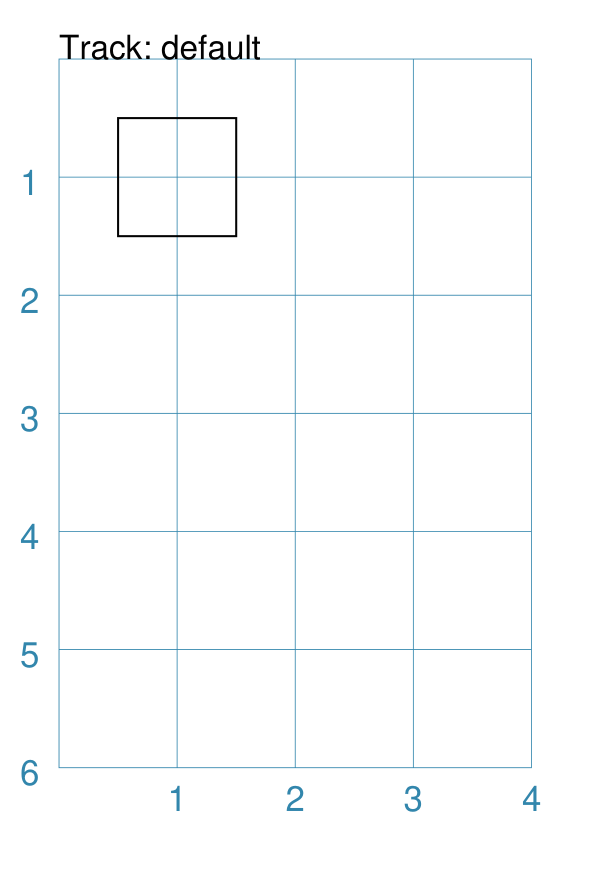
This example shows the Track constructed using the default values for its properties. Track()
The default Track is a However, because no shapes have been assigned to be drawn on the Track, the program will issue a warning: WARNING:: Track needs at least one Shape assigned to shapes list
|
Example 2. Track with a Shape
|
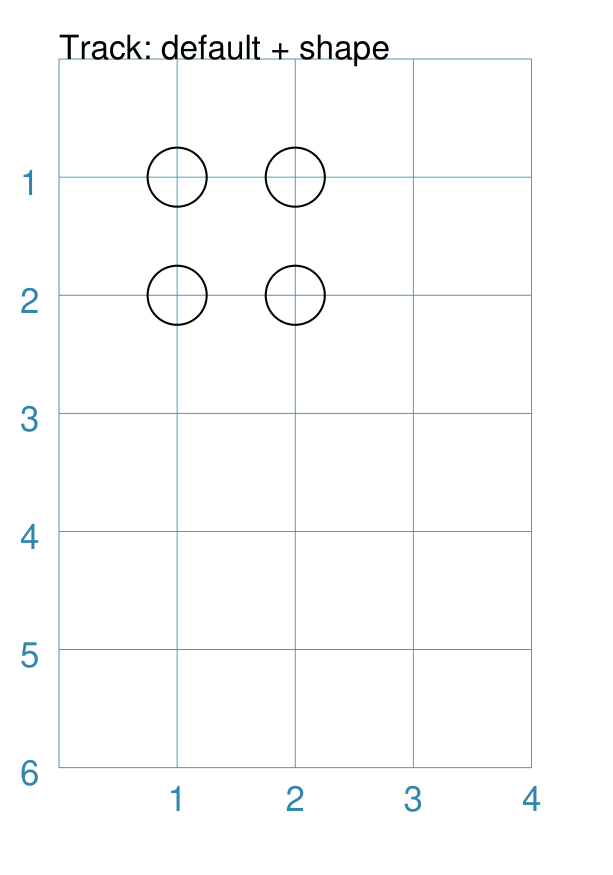
This example shows the Track constructed using differing values for its properties. Track(
rectangle(),
shapes=[circle(radius=0.25, fill=None)]))
This is similar to the first example; the main difference is the specification of shapes. The shapes property causes a The
|
Example 3. Track with sequence
|
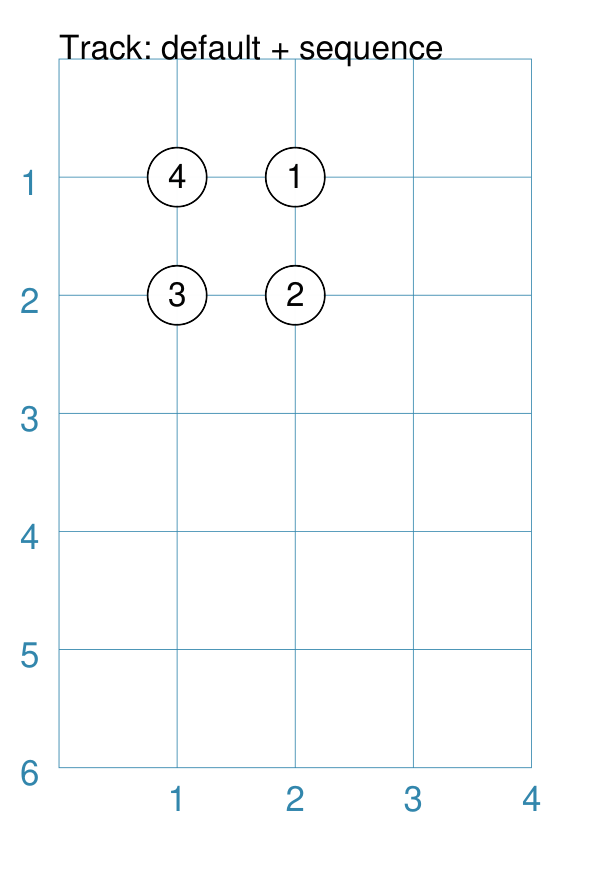
This example shows the Track constructed using differing values for its properties. shp = circle(
cx=1, cy=1, radius=0.5, label='{{sequence}}')
Track(
rectangle(),
shapes=[shp])
This is similar to the second example. The difference is using a label with a value of {{sequence}} for the shape being drawn. In this case, the label value is replaced by the actual number. The For this, and further examples, the shape to be drawn is defined before the track; this makes the script less cluttered and easier to read; but it does not have to be written this way. |
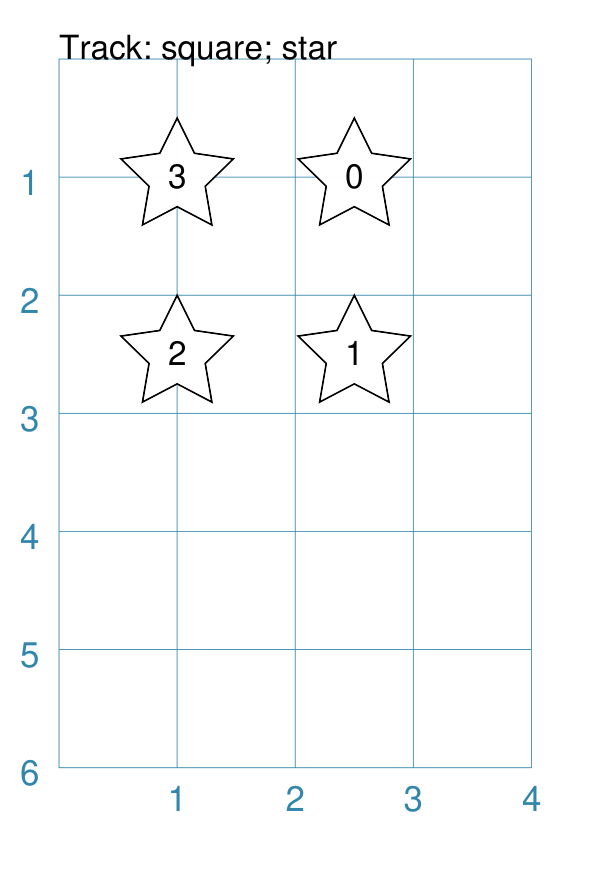
Example 4. Square Track with Star
|
This example shows the Track constructed using differing values for its properties. shp = star(
cx=1, cy=1, vertices=5, radius=0.5,
label='{{sequence - 1}}')
Track(
square(side=1.5),
shapes=[shp])
This is very similar to the third example — a track laid out in the clockwise direction starting with the top-right corner — the differences being:
|
Example 5. Polygon Track
|
This example shows the Track constructed using differing values for its properties. shp = hexagon(
cx=1, cy=1, height=0.5,
label='{{sequence}}')
Track(
polygon(cx=2, cy=3, radius=1.5, sides=8),
shapes=[shp])
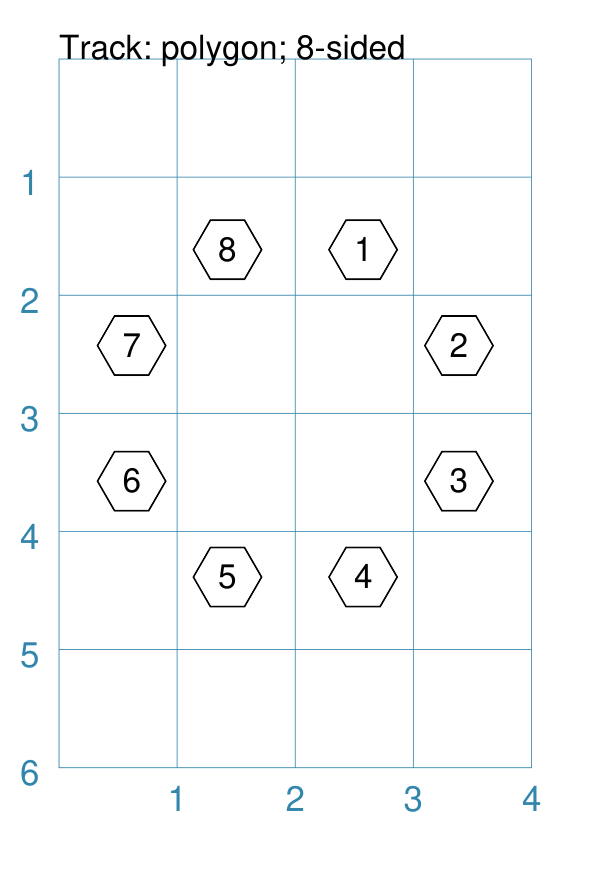
Because the vertices of a regular polygon lie on the diameter of a
circle, a In this example, there are eight hexagons in a circular arrangement - one drawn at each of the vertices of an octagon (an eight-sided polygon). The polygon numbering starts on the top-right / north-east (or close to that location) of the figure and continues in a clockwise direction. |
Example 6. Polygon Track with start and stop
|
This example shows the Track constructed using differing values for its properties. shp = hexagon(
cx=1, cy=1, height=0.5,
label='{{sequence}}')
Track(
polygon(cx=2, cy=3, radius=1.5, sides=8),
shapes=[shp],
start=3,
stop=6)
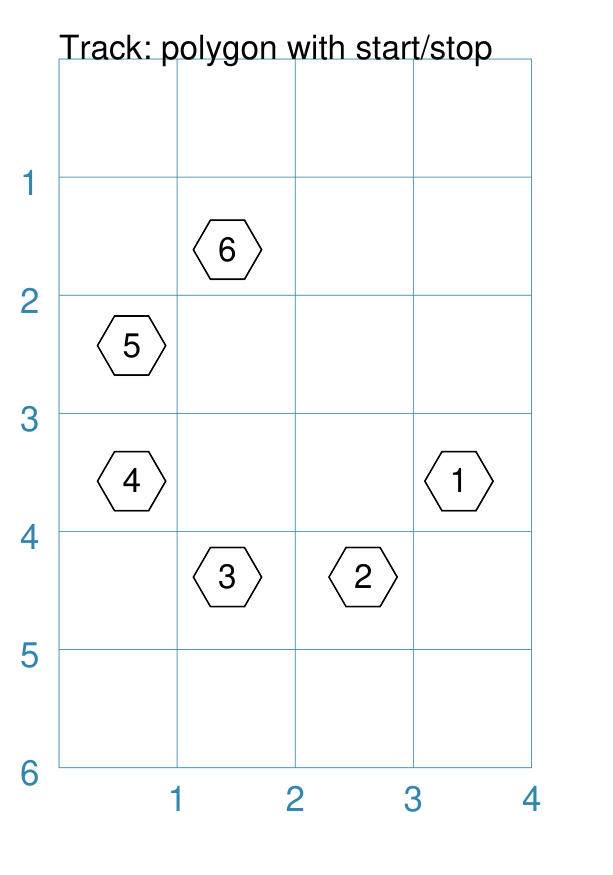
This is very similar to the fifth example; but, in this case, a start and stop property are added. The start shifts the start of the numbering to what would normally be the third location. The stop means that the sequence (and hence the drawing of the hexagon shape) stops when it reaches the value six in the sequence. |
Example 7. Polyline Track
|
This example shows the Track constructed using differing values for its properties. shp = circle(
cx=1, cy=1, radius=0.25,
label='{{sequence}}')
Track(
Polyline(points=[
(0, 0), (1, 2), (2, 1), (3, 3), (1, 5)]),
shapes=[shp])
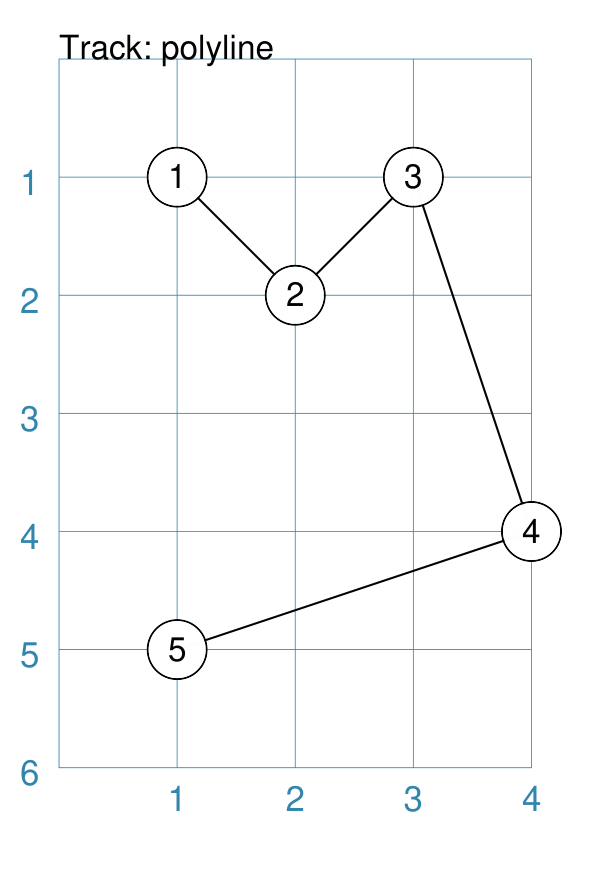
A In this example, because |
Example 8. Circle Track - clockwise
|
This example shows the Track constructed using differing values for its properties. shp = hexagon(
cx=1, cy=1, height=0.5,
label='{{sequence}}')
Track(
Circle(cx=2, cy=3, radius=1.5),
angles=[30,120,210,300],
shapes=[shp],
clockwise=True)
In order to draw shapes on a Again, in this example, because |
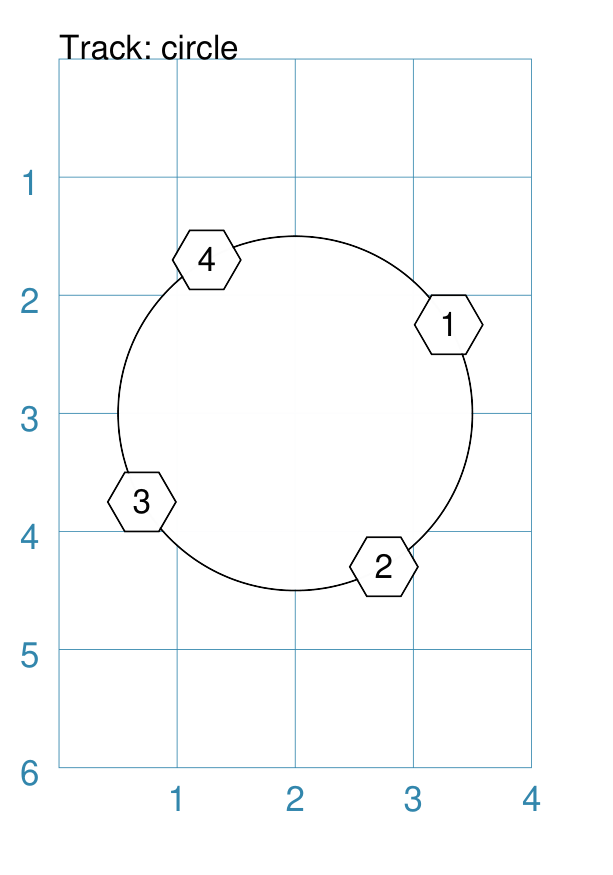
Example 9. Polygon Track - custom shape
|
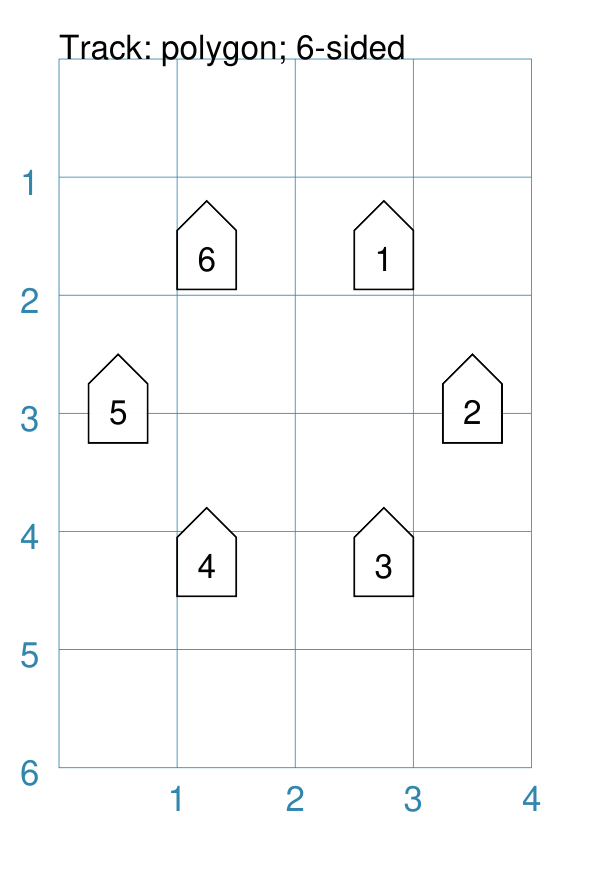
This example shows the Track constructed using differing values for its properties. shp = rectangle(
cx=1, cy=1,
width=0.5, height=0.5,
label='{{sequence}}',
peaks=[("n", 0.25)])
Track(
polygon(
cx=2, cy=3, sides=6,
radius=1.5),
shapes=[shp])
This is very similar to the third example; the only differences being
that a different shape (the |
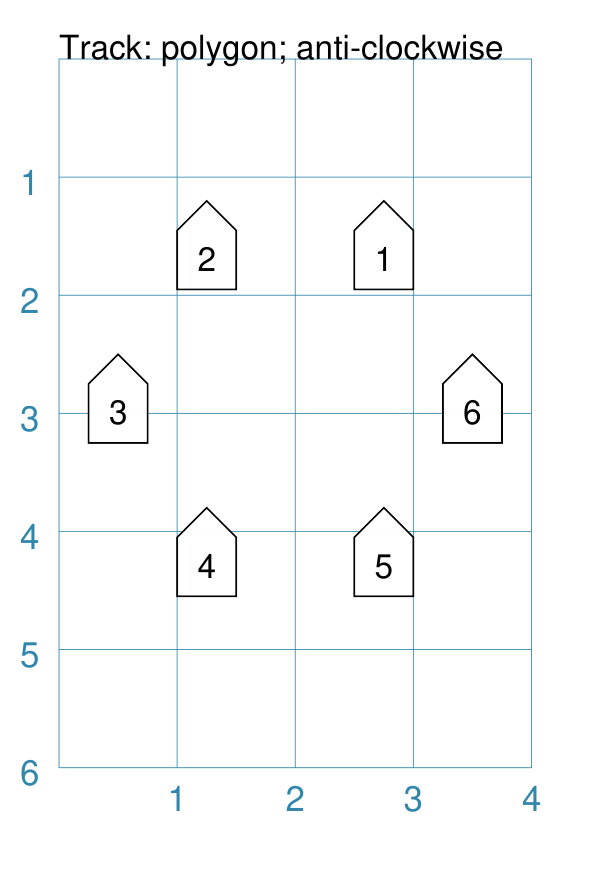
Example 10. Polygon Track - clockwise
|
This example shows the Track constructed using differing values for its properties. shp = rectangle(
cx=1, cy=1,
width=0.5, height=0.5,
peaks=[("n", 0.25)],
label='{{sequence}}')
Track(
polygon(
cx=2, cy=3, sides=6,
radius=1.5),
shapes=[shp],
clockwise=True)
This is very similar to the ninth example; the only difference being that the direction of drawing is now clockwise. |
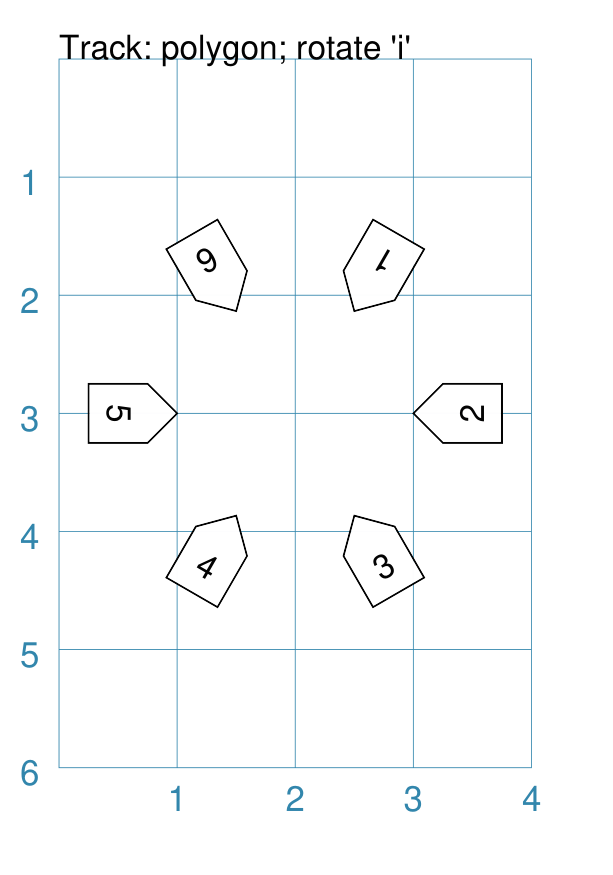
Example 11. Polygon Track - inwards
|
This example shows the Track constructed using differing values for its properties. shp = rectangle(
cx=1, cy=1,
width=0.5, height=0.5,
peaks=[("n", 0.25)],
label='{{sequence}}')
Track(
polygon
cx=2, cy=3, sides=6,
radius=1.5),
shapes=[shp],
rotation_style='i')
This is very similar to the ninth example; the only difference being
that the shapes themselves are re-orientated to face inwards, by using
|
Example 12. Polygon Track - outwards
|
This example shows the Track constructed using differing values for its properties. shp = rectangle(
cx=1, cy=1,
width=0.5, height=0.5,
peaks=[("n", 0.25)],
label='{{sequence}}')
Track(
polygon(
cx=2, cy=3, sides=6,
radius=1.5),
shapes=[shp],
rotation_style='o')
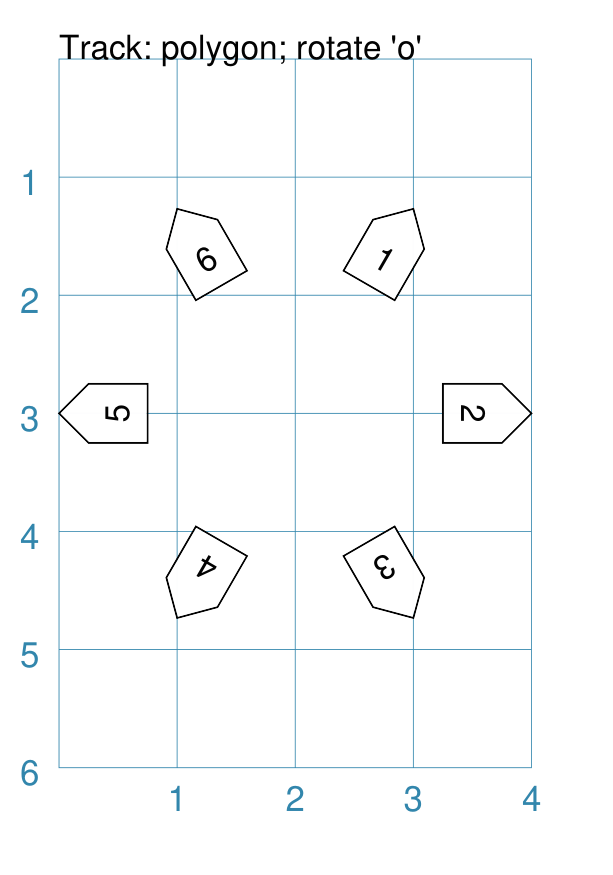
This is very similar to the ninth example; the only difference being
that the shapes themselves are re-orientated to face outwards, by using
|
Example 13. Circular Track - inwards
|
This example shows the Track constructed using differing values for its properties. shp = rectangle(
cx=1, cy=1,
width=0.5, height=0.5,
peaks=[("n", 0.25)],
label='{{sequence}}')
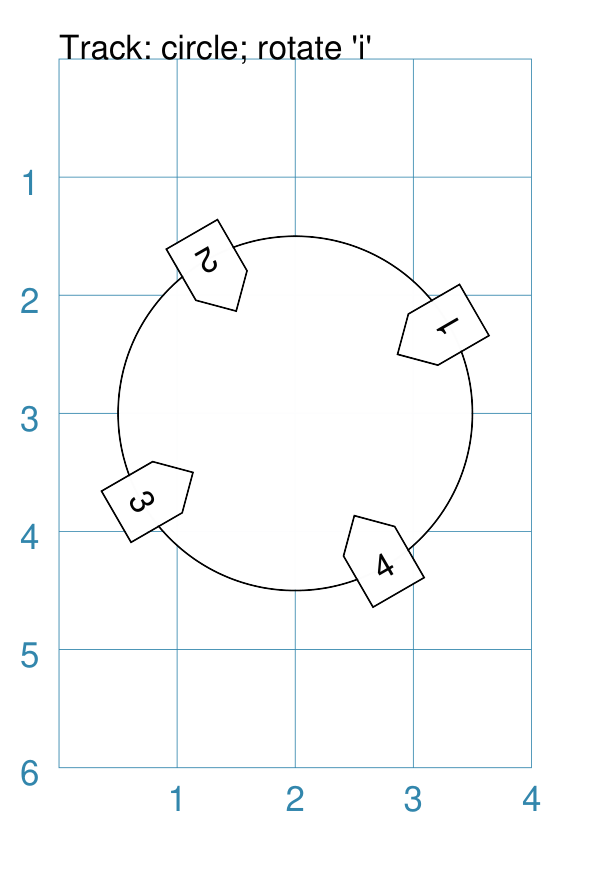
Track(
Circle(cx=2, cy=3, radius=1.5),
angles=[30,120,210,300],
shapes=[shp],
rotation_style='i')
This is very similar to the twelfth example; the only difference being that a circular track, with locations specified by angles is used. |
Example 14. Rectangular Track - inwards
|
This example shows the Track constructed using differing values for its properties. shp = rectangle(
cx=1, cy=1,
width=0.5, height=0.5,
peaks=[("n", 0.25)],
label='{{sequence}}')
Track(
Rectangle(
cx=2, cy=3,
height=2, width=2),
shapes=[shp],
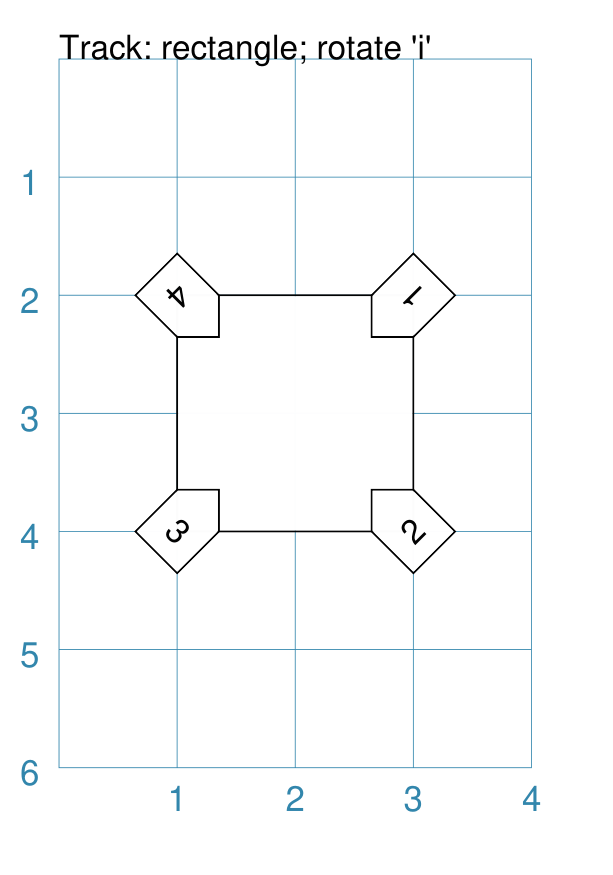
rotation_style='i')
This is very similar to the eleventh example; the only difference being that a rectangular track is used. |
Example 15. Rectangular Track - outwards
|
This example shows the Track constructed using differing values for its properties. shp = rectangle(
cx=1, cy=1,
width=0.5, height=0.5,
peaks=[("n", 0.25)],
label='{{sequence}}')
Track(
Rectangle(
cx=2, cy=3,
height=2, width=2),
shapes=[shp],
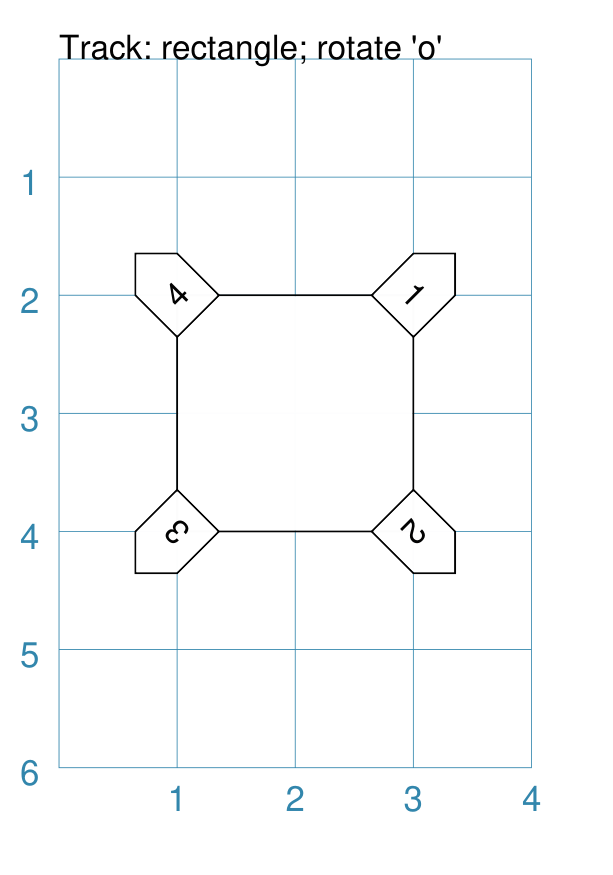
rotation_style='o')
This is very similar to the twelfth example; the only difference being that a rectangular track is used. |
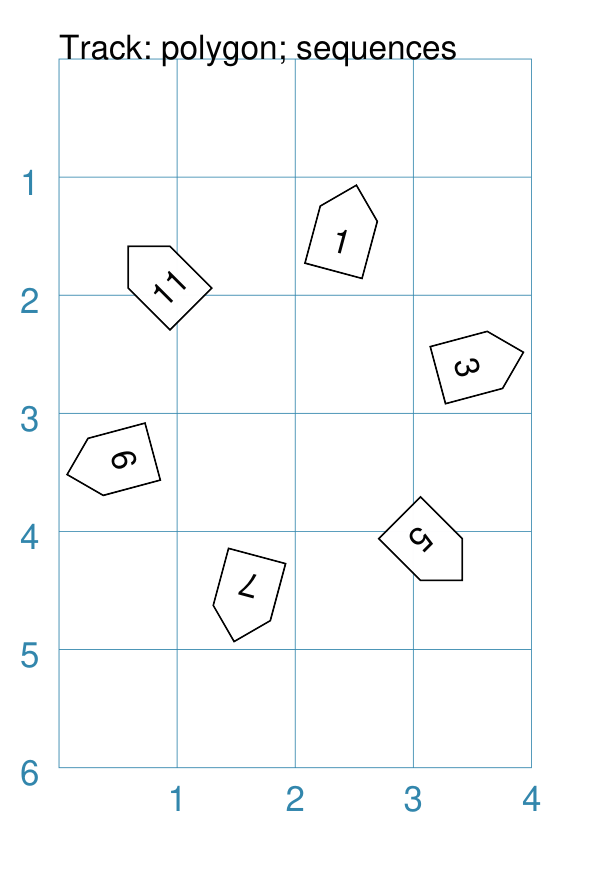
Example 16. Polygon Track - sequences
|
This example shows two Tracks constructed using differing values for their properties. shp = rectangle(
cx=1, cy=1,
width=0.5, height=0.5,
peaks=[("n", 0.25)],
label='{{sequence}}')
Track(
polygon(
cx=2, cy=3, sides=12,
radius=1.5),
shapes=[shp],
rotation_style='o',
sequences=[1,3,5,7,9,11])
Here, the sequences property is set to draw the shape at every odd location. As elsewhere, sequences can be specified using a string; for
example: |
Example 17. Multiple Tracks - starts
|
This example shows the Track constructed using differing values for its properties. shp = circle(
cx=0, cy=0, radius=0.25,
label='{{sequence}}')
# polygon
Track(
Polygon(
cx=1, cy=5, radius=0.5,
sides=4, stroke="red", fill="gold"),
shapes=[shp])
Track(
Polygon(
cx=3, cy=5, radius=0.5,
sides=4, stroke="red", fill="gold"),
shapes=[shp],
clockwise=False)
# circle
Track(
Circle(
cx=1, cy=3, radius=0.5,
stroke="red", fill="aqua"),
shapes=[shp],
angles=[45,315,225,135])
Track(
Circle(
cx=3, cy=3, radius=0.5,
stroke="red", fill="aqua"),
shapes=[shp],
angles=[45,315,225,135],
clockwise=False)
# square
Track(
Square(
x=0.75, y=0.75, side=0.75,
stroke="red", fill="orange"),
shapes=[shp])
Track(
Square(
x=2.75, y=0.75, side=0.75,
stroke="red", fill="orange"),
shapes=[shp],
clockwise=False)
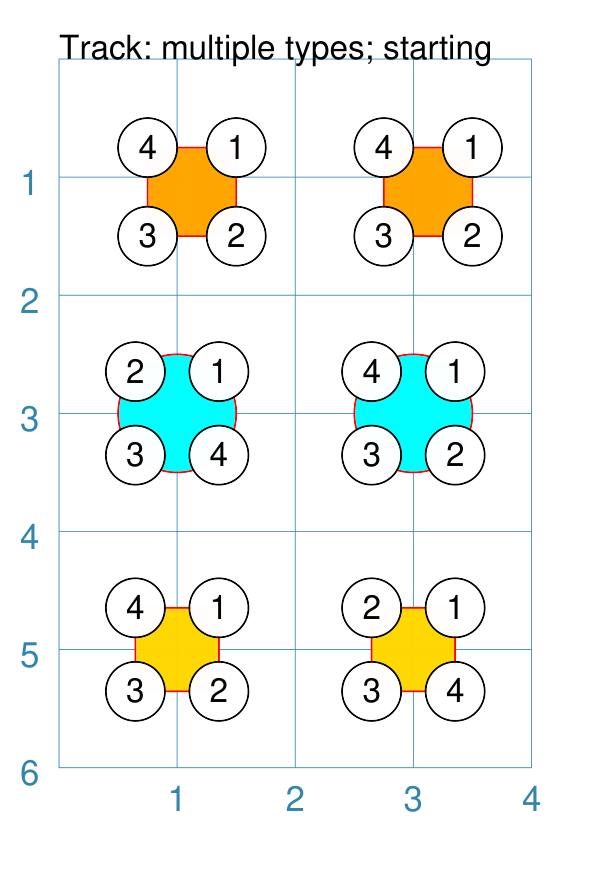
The purpose of this example to show that the start location varies per type of track used; from top to bottom these are:
In each case, the track itself is being shown in red. |
Example 18. Circular Track - clock
|
This example shows the Track constructed using differing values for its properties. Circle(
cx=2, cy=3, radius=1.8,
stroke_width=2, dot=0.1)
times = circle(
cx=1, cy=1, radius=0.25, stroke="white",
label='{{sequence}}', label_stroke="black")
Track(
circle(cx=2, cy=3, radius=1.5),
angles=[60,90,120,150,180,210,240,270,300,330,0,30],
shapes=[times])
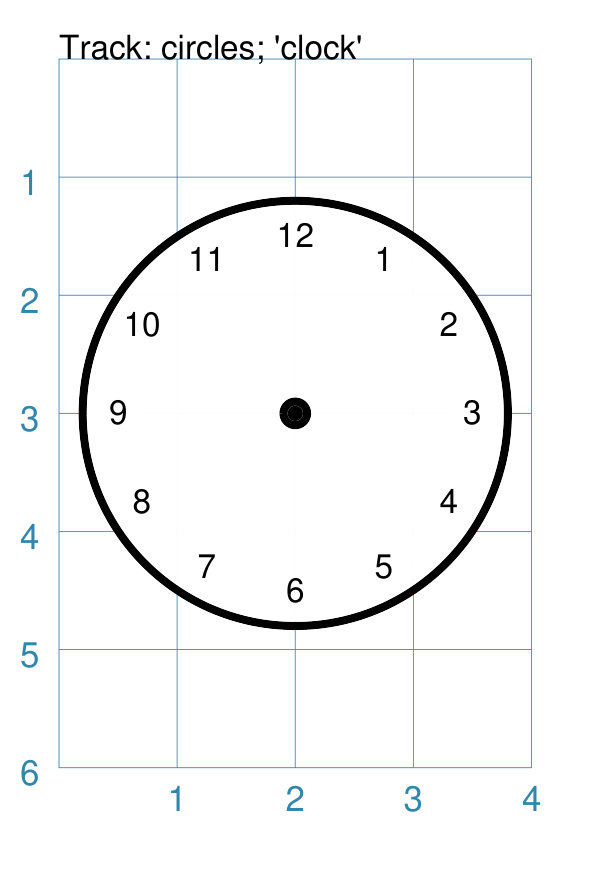
This example is to show how a track could be used to construct a familiar shape - an analog clock face. By setting the angles in the desired order, the clock numbering starts at the correct place to show the ‘hours’. The outer |
Example 19. Polygon Track - scoring
|
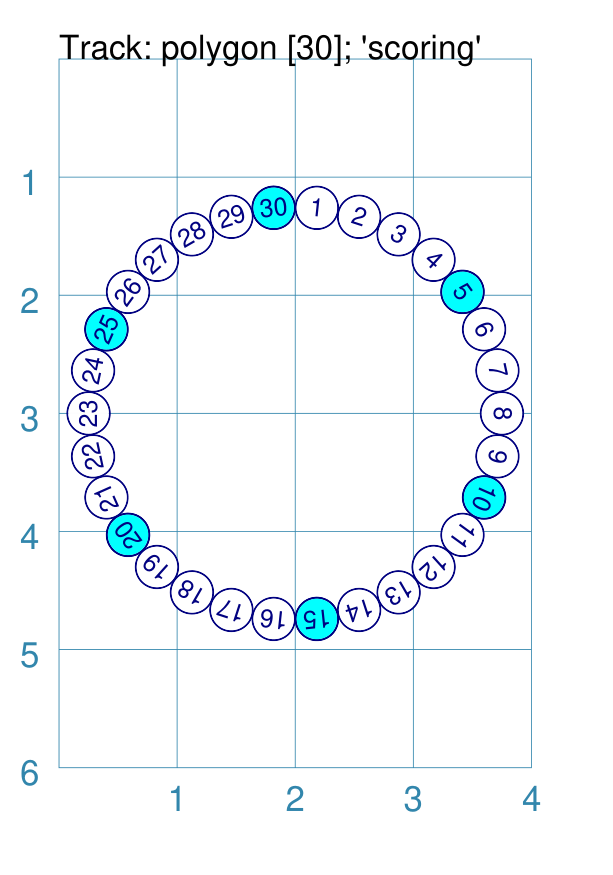
This example shows two Tracks constructed using differing values for their properties. trk = polygon(cx=2, cy=3, sides=30, radius=1.75)
score = Common(
cx=1, cy=1, radius=0.18, stroke="navy",
label='{{sequence}}', label_size=6)
# white circles - track one
shp = circle(common=score, fill="white")
Track(
trk,
shapes=[shp],
rotation_style='o',
start=1
)
# blue circles - track two
shp5 = circle(common=score, fill="aqua")
Track(
trk,
shapes=[shp5],
rotation_style='o',
start=1,
sequences=[5,10,15,20,25,30,35]
)
This example shows how a track could be used to construct a familiar shape — a scoring track for a game. In this case, a 30-sided polygon is used as the basis for the track. Two tracks are constructed:
The tracks’ shapes share a common property, as the only difference between them is their fill color. The blue circles are only drawn at every fifth location, as set in the sequences property of the second track. |