Cards: Images, Symbols and Fonts
This section assumes you are very familiar with the concepts, terms and ideas for protograf as presented in the Basic Concepts , that you understand all of the Additional Concepts and that you’ve created some basic scripts of your own using the Core Shapes.
Note
This section provides further information about how images, together with fonts, can be used to add graphics to cards. It will be helpful if you have already read the other sections referred to in the card’s overview section: Working with Cards.
Overview
The use of graphics — both images and symbols — to readily convey information has become prevalant in board and card games. Once you understand the meaning or association of that image or symbol in the context of the game, its usually much faster to recognise and act on it than it is to read a full sentence or a phrase.
protograf supports a number of ways to incorporate such graphics into a card, whether standlone or as part of text.
Terminology
Images
Image is the term used for any kind of illustration - artwork, line drawings, photographs, AI-generated images and so on.
Symbols, Glyphs and Icons
Symbols, glyphs and icons are usually small, simple images, often composed of a few lines of drawing, and containing only a few colors.
A symbol is a broad term for anything representing an idea or concept e.g. a heart for love; a company logo
An icon is a type of symbol that directly represents a common object through a recognizable image e.g. a trash can represents deleting a computer file
A glyph is an instance of a typographic character or a recognizable image e.g. the @ sign
These graphics can be found as “stand alone” images — typically as
small .png or .svg format files — or embedded in a font.
If part of a font, they are often accessed via their Unicode “address” —
usually a 4 character string prefixed with a \u.
In protograf the term symbol will be used to encompass all of the above.
Stand-alone Images
A “stand-alone” image is not part of a text string and can be displayed directly on any part of a card; this is fully described in the Image Command.
Hint
Remember that when defining an image to appear on a card, you should
usually use the command with a lowercase initial i.e. image()
rather than Image(), as this will defer it being drawn to when the
card itself is drawn.
Inline / Embedded Images and Symbols
It is not uncommon to “embed” or “inline” a symbol or image in the text
itself; so, for example, instead of the phrase take 2 gold, the text will
display +2  — in this case the picture of the gold could either
be an image or a symbol from a font.
— in this case the picture of the gold could either
be an image or a symbol from a font.
Image References
The way to reference an image file within HTML Text is to
surround it with a pair of marker symbols: |: ... :|. At the start,
the |: is used and at the end the :| is used. These symbols should
enclose the name of the image file.
The name can also be followed by a space and a number — where the number
represents the required height of the image; larger images will be shrunk
to this size. If the extension is missing from the filename, the .png
extension will be added. For example:
|:openmoji--fish 14:|
will be replaced in the text by:
<img src="openmoji--fish.png" height="14" />
Hint
An alternative pair of marker symbols that can be used for SVG files is:
|; ... ;|. In this case, if the extension is missing from the filename,
the .svg extension will be added.
NOTE The current underlying software does not support transparency for SVG images — ensure the images you use have a background color that matches the area where they are being used!
Symbol References
The way to reference a font symbol within HTML Text is to
surround it with a pair of marker symbols: |! ... !|. At the start,
the |! is used and at the end the !| is used. These symbols should
enclose the character symbol being referenced.
The name can also be followed by a space and a number — where the number represents the required point size of the symbol. It can be further followed by a color reference — either a name or hexadecimal code — that will be used to change the symbol’s color.
For example:
|!\u2666 14 red!|
will be replaced in the text by a red diamond shape — assuming that the default symbol font is not changed (see below for the IconFont Command).
<img src="openmoji--fish.png" height="14" />
IconFont Command
The IconFont() command is very similar to the
Font command but with one significant difference.
The only purpose of this command is to set a different font that is used, from the point onwards from where it is set in the script, for the symbols that are being referenced in HTML Text.
If not set, protograf will default to using Helvetica font as the source for any symbol references.
Text with Embedded Images and Symbols
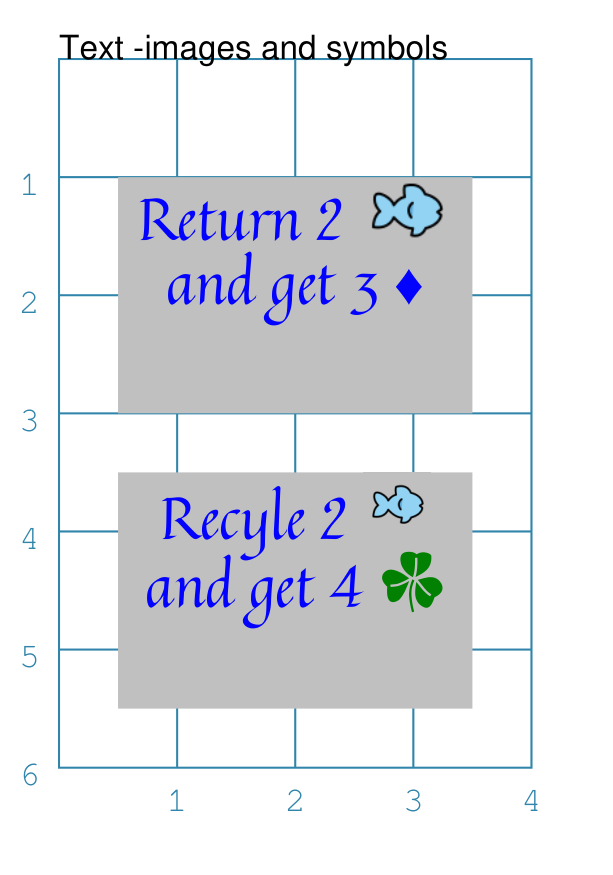
Both of the following examples below show how images or font symbols can be embedded in HTML Text.
|
This example shows Text constructed using commands with the following properties: IconFont("Arial")
Text(x=0.5, y=1,
width=3, height=2,
html=True,
box_fill="silver",
text="""
<div style="
font-family: Quintessential;
font-size:14.0px;
color:blue;
text-align:center;">
Return 2 |:openmoji--fish 14:|
and get 3 |!\u2666!|
</div>"""
)
IconFont("game-icons-net-20200315a")
Text(x=0.5, y=3.5,
width=3, height=2,
html=True,
box_fill="silver",
text="""
<div style="
font-family: Quintessential;
font-size:14.0px;
color:blue;
text-align:center;">
Recyle 2 |;openmoji--fish 16;|
and get 4 |!\uEB73 16 green!|
</div>"""
)
In the HTML Text, markup is used to format
the main text; in this case to set the style within a The top example shows how the image marker symbols The lower example shows how the image marker symbols Hint The fonts used in this example can be sourced from: The small fish image marker is part of a set available from https://icon-sets.iconify.design/openmoji/ |

Cards with Text Embedded Images and Symbols
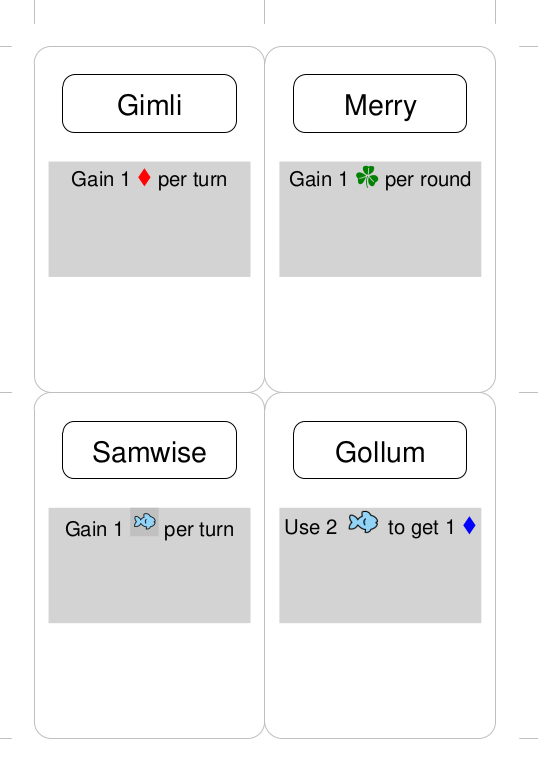
Both of the following examples below show how images or font symbols can be embedded in HTML Text used in cards.
|
This example shows character Cards constructed using commands with the following properties: Create(
filename='cards_symbols.pdf',
margin=1.25,
paper="A6")
# deck data
lotr = [
['ID', 'Name', 'Age', 'Race', 'Ability', 'Copies'],
[1, "Gimli", 140, "Dwarf",
"Gain 1 |!\u2666 12 red!| per turn", 1],
[6, "Merry", 37, "Hobbit",
"Gain 1 |!\uEB73 12 green!| per round", 1],
[7, "Samwise", 39, "Hobbit",
"Gain 1 |;openmoji--fish 14;| per turn", 1],
[9, "Gollum", None, "Hobbit",
"Use 2 |:openmoji--fish 12:| to get 1 |!\u2666 12 blue!|", 1],
]
Data(data_list=lotr)
# design the deck
Deck(
cards=1,
height=6, width=4,
grid_marks=True,
rounding=0.3,
fill=None,
stroke="gray",
copy='Copies')
# character Name
name_box = rectangle(
x=0.5, y=0.5,
width=3, height=1,
rounding=0.2)
Card("*", name_box)
Card("all",
text(
text=T("{{ Name }}"),
x=2, y=1.2,
font_size=14))
# character Ability
IconFont("game-icons-net-20200315a")
able = text(
x=0.25, y=2,
width=3.5, height=2,
font_size=10,
box_fill="lightgrey",
html=True,
text=T("{{ Ability }}")
)
Card("all", able)
For the HTML Text text, the This example shows how the image marker symbols Because the
|