Special Functions
This list provides a guide to using all the functions that are specific to protograf.
Note
protograf is a small, specialised tool; but its part of a much greater Python language “ecosystem”, and functions from the Python language — or other Python packages — can be also be used to further enhance your own script.
Overview
Functions — in both protograf and Python — represent “tools” designed to process or create data to achieve a specific outcome.
The section on Python language explains how to use
some of its built-in functions, such as range, but there are many, many
more.
protograf provides some functions specific to its own purpose of enabling creation of cards and other graphic layouts.
In all cases, a function is used or activated through its name followed by
round brackets; something like this — the_function_name(). In some
cases, additional properties — much like the ones used for a
Command() — can be set to customise the
function’s behaviour.
Summary
split()
The split() function is used to turn a string into a list; for example:
split("A,B,C")
which generates this list: ["A", "B", "C"]
or:
split("A B C")
which also generates this list: ["A", "B", "C"] - this is because, in the
absence of a comma, the whitespace is used to separate items.
If you use another symbol as a separator, you can set this with a separator property; for example:
split("A;B;C", separator=";")
which generates this list: ["A", "B", "C"]
If you have extra white space in the string, it can be removed with clean property; for example:
split("A; B; C", separator=";")
generates this list: ["A", " B", " C"] with spaces left in, but:
split("A; B; C", separator=";", clean=True)
generates this list: ["A", "B", "C"]
steps()
The steps() function is used to generate a list of numbers.
There are two required properties: start and end but is usual to omit the names and just supply the values; for example:
steps(1, 10)
which generates this list: [1, 2, 3, 4, 5, 6, 7, 8, 9, 10]
By default, the third property, called the step is set to 1.
This can be changed; for example:
steps(1, 10, 2)
which generates this list: [1, 3, 5, 7, 9]
The numbers can be decimal values, and the step can be negative, for example:
steps(10.5, 1.5, -2.25)
which generates this list: [10.5, 8.25, 6.0, 3.75, 1.5]
uni()
The uni() function is used to access a symbol, or glyph, from a font’s
character set by providing its Unicode text value as U+ value.
For example, a glyph in a specific font may have a “meeple” symbol
(https://en.wikipedia.org/wiki/Meeple) which is represented
by the Unicode text value U+EA40. This value can be seen in a
font management program:
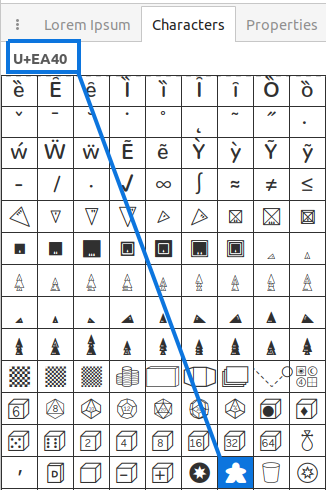
To use this in a script, simply wrap it in the function as:
uni("U+EA40") after the font has been set (see the
Font() command).
group()
The group() function is used when working with
Card Decks - see group()
for more details.