Dominoes
This section assumes you are very familiar with the concepts, terms and ideas for protograf as presented in the Basic Concepts , that you understand all of the Additional Concepts and that you’ve created some basic scripts of your own using the Core Shapes. You also be familiar with the various types of shape’s properties described in the Customised Shapes
Overview
Dominoes are widely used in a number of games, so being able to easily add them to a graphic layout can be useful.
Domino Properties
The rectangular object Domino shares some of the basic properties of many
other shapes, with additional properties of pips and
random, as well as the various pip_ properties.
A Domino is effectively two D6 dice placed side-by-side.
Domino Styling
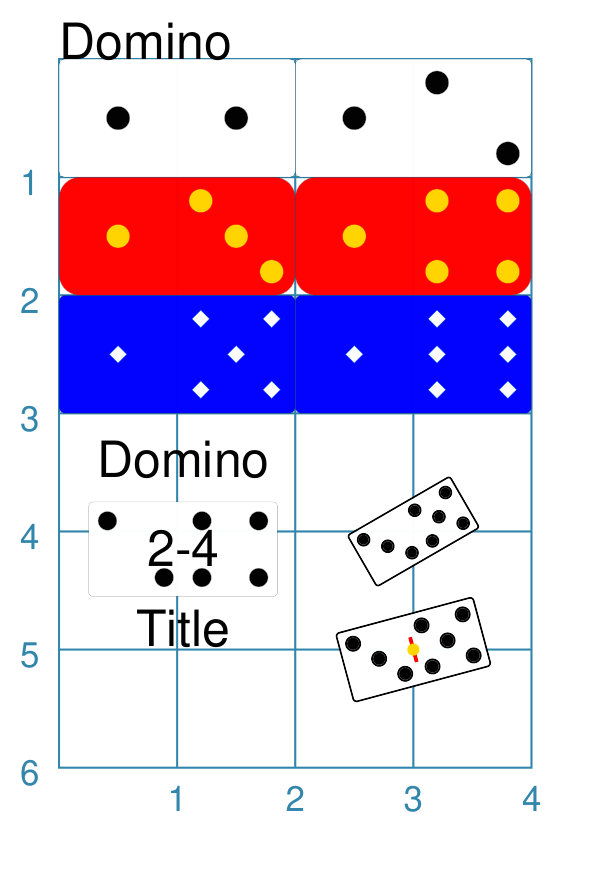
The examples below shows how a Domino can be created and styled.
|
This example shows Domino objects constructed using these commands: # ---- styling properties
red_yello = Common(
pip_fill="gold",
pip_stroke="orange",
fill="red", rounding=0.175)
blu_wite = Common(
pip_fill="white",
pip_shape="diamond",
pip_stroke="aqua",
fill="blue", pip_fraction=0.15)
# ---- basic Domino
Domino(x=0, y=0)
Domino(x=2, y=0, pips=(1, 2))
# ---- color rounded Domino
Domino(x=0, y=1, pips=(1, 3),
common=red_yello)
Domino(x=2, y=1, pips=(1, 4),
common=red_yello)
# ---- color smaller Domino
Domino(x=0, y=2, pips=(1, 5),
common=blu_wite)
Domino(x=2, y=2, pips=(1, 6),
common=blu_wite)
# ---- sized, rotation, centre_line
Domino(
x=0.25, y=3.75,
side=0.7,
pips=(2, 4),
title="Title",
heading="Domino",
label="2-4",
label_size=8)
Domino(
cx=3, cy=4,
side=0.5,
pips=(3, 5),
stroke_width=0.5,
rotation=30)
Domino(
cx=3, cy=5,
side=0.6,
centre_line=True,
centre_line_stroke="red",
centre_line_stroke_width=1,
centre_line_length=0.22,
centre_shape=dot(stroke="gold"),
pips=(3, 5),
stroke_width=0.5,
rotation=15)
# ---- custom shape for pips
Domino(
x=0, y=5,
stroke_width=0.5,
pips=(3, 8),
pip_shape=polygon(
side=0.125, sides=3))
Domino(
x=2.25, y=5,
stroke_width=0.5,
side=0.75,
pips=(1, 6),
pip_shape=polygon(
side=0.1, sides=6),
rotation=15)
All of the Domino shapes are constructed in the same way — setting an x and y value (or cx and cy). The red dominoes show how the pip stroke and fill can be set to different colors. The blue dominoes show how the pips size and shape can be changed.
Size is represented as a fraction of the height of the domino. The default
size is one-fifth ( The white dominoes in the lower-middle section show how the Domino, like many other shapes, can be assigned text captions, and that it can be rotated. The stroke_width of the rotated dominoes has also been made thicker. A domino can also be assigned centre_line and/or centre_shape
properties; this can be seen in the one lower-middle right example.
The centre_line can be styled using the usual appended names,
including The white dominoes in the bottomost section show how the Domino’s
pips can be assigned to an shape that can be centred; in these
example, a |