Cubes
This section assumes you are very familiar with the concepts, terms and ideas for protograf as presented in the Basic Concepts , that you understand all of the Additional Concepts and that you’ve created some basic scripts of your own using the Core Shapes. You also be familiar with the various types of shape’s properties described in the Customised Shapes
Overview
Cubes are widely used in many games, so being able to easily add them to a graphic layout can be useful.
Cube Properties
The hexagonal-shaped object Cube shares all of the properties of the
Hexagon; in addition, it has its own property called
shades.
Cube Examples
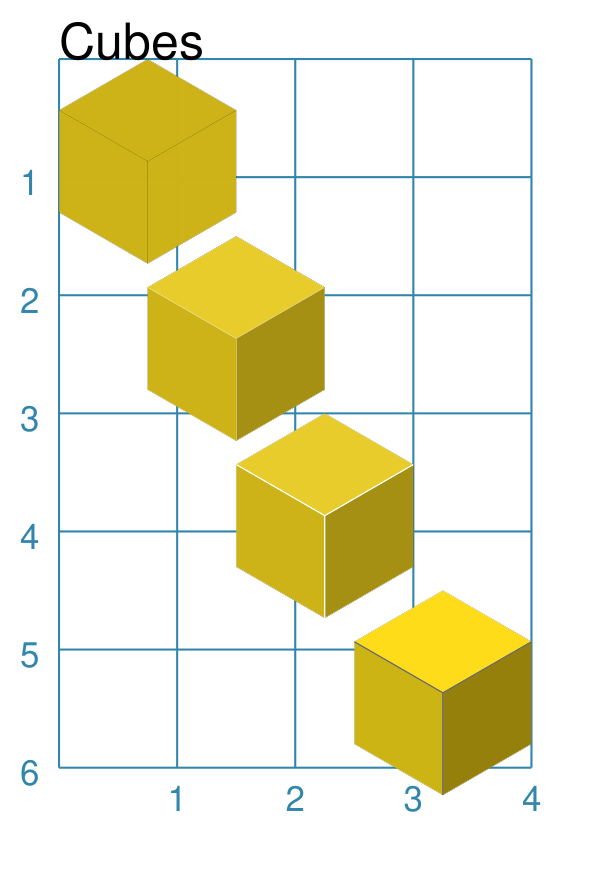
The examples below shows how a Cube can be created and styled.
Cube Styling
|
This example shows Cube objects constructed using these commands: YELLOW = "#CEB316" # old gold
Cube(x=0, y=0, height=1.5,
fill=YELLOW)
Cube(x=0.75, y=1.5,
height=1.5,
shades=YELLOW)
Cube(x=1.5, y=3, height=1.5,
shades=YELLOW,
radii_stroke="white",
radii_stroke_width=0.4)
Cube(x=2.5, y=4.5, height=1.5,
shades=["#FFDC17", "#957F0A", "#CCB412"],
radii_stroke="dimgray",
radii_stroke_width=0.2)
All of the Cube shapes are constructed in the same way — setting an x and y value as well as height. The height is the distance between opposing flat sides. The top example shows a Cube with only a fill color set. In this case, the three radii are automatically drawn in the default stroke color in order to create the cube “effect”. The second example shows a Cube with a single color set for shades. In this case, the program will automatically create the darker and lighter shades of that color and use them to style the Cube. Note that radii are now not drawn. The third example shows a Cube with a single color set for shades. In this case, the program will automatically create the darker and lighter shades of that color and use them to style the Cube. The radii_stroke color has been set and this will cause the three radii to be automatically drawn. The final example at the bottom shows a Cube with a three colors set for the shades. These will be used “as is” — no darker or lighter ones created — for the three “sides” of the cube. The radii_stroke color has been set and this will cause the three radii to be automatically drawn. |